RipX DAW Pro
the AI-based DAW with additional powerful features
 Instant Delivery
₹19,081 (incl. GST)
Instant Delivery

Software is not returnable.
RipX DAW PRO builds on the power of RipX DAW—and takes it to the next level. With advanced harmonic editing, ultra-precise audio repair tools, and state-of-the-art noise and instrument separation, PRO gives you unmatched control over every sound detail.
Restore damaged recordings, completely reshape audio to fit your creative vision, or experiment to craft sounds the world has never heard before.
RipX DAW PRO adds the following features and much more:
- Award-winning Audioshop® tools for fixing and cleaning up recordings quickly and easily
- Unpitched audio editor for cleaning up noise separately from pitched sounds
- The powerful and unique Harmonic Editor for the ultimate in sound editing
- RipScript scripting language for building and customizing your own tools
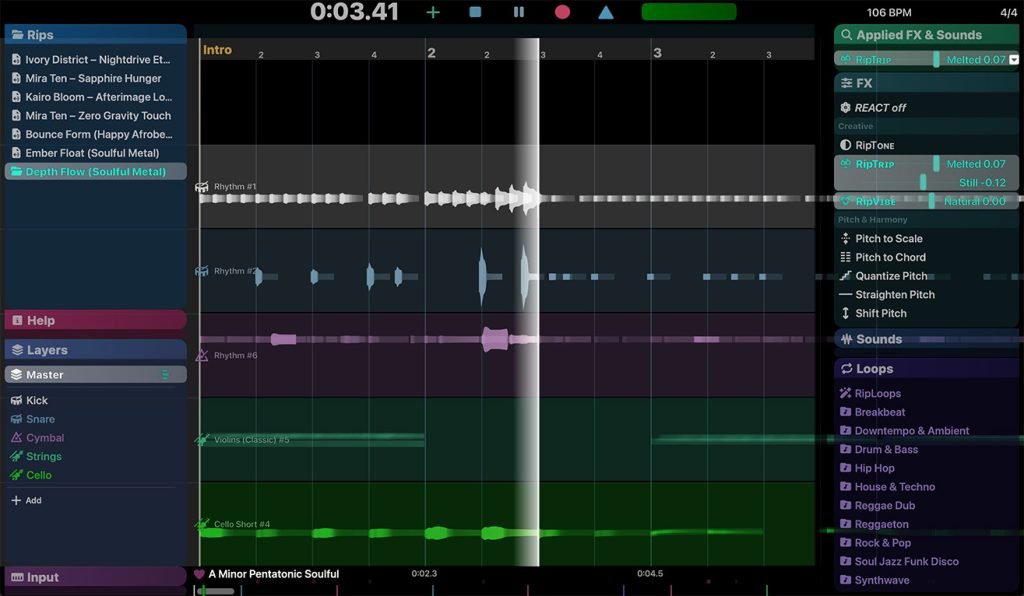
Experience unprecedented control over notes, harmonics and unpitched sound, all in a powerful and easy-to-use click & drag interface.
Audioshop® Sound Manipulation Tools
- Powerfully & quickly adjust pitch, time-stretch, copy and paste individual or groups of notes, sibilants and unpitched sounds.
- Edit Unpitched tool displays all unpitched sound spread over the entire Rip, from its top to its bottom. Click & drag to select a region of unpitched sound and edit it.
- Draw notes, drums and samples onto your rip with the Draw Sound tool.
- Use the Split tool to cut notes into sections for further editing.
- Piece together notes so you can edit as one, with the Join tool.
- Clone characteristics such as pitch variation (e.g. vibrato), sound (timbre with volume) & panning from one note to another, for example to duplicate a real instrumentalist’s playing style, with the Clone tool.
- Make fine pitch adjustments and slides simply by clicking and dragging, with the Draw Pitch tool.
- Add fluctuations in pitch, formant, volume, and panning to notes, using the Apply Pattern tool.
- Blend together the pitch, formant, timbre, volume and/or stereo panning of notes by clicking & dragging over them, with the Smooth Region tool.
Harmonic Editor
- This is no basic spectrum editor – these are the actual harmonics that describe the sound of a note, and Harmonic Editor allows complete control over them.
- Perfect for removing noise, adjusting timbre and creating interesting new sounds.
Clean & Repair Audio
- Live audio repair and clean-up features for removing background noise, limiting foreground artifacts, reducing tones & hum, and purifying pitched and unpitched sounds.
- Adjust overtone levels in notes and even regenerate fundamental harmonics, to bring back bass presence in vocals and instruments, lost during mixing & mastering.
for Music Producers
- Efficient workflow with major DAWs using the RipLink VST3/ARA2 & AudioSuite plug-in.
- Unrivalled, easy access to unintended notes, sounds and noise that you may want to remove, or reuse/boost for effect (e.g. knocks, coughs, twangs, additional strings played, breath, bleed from other vocal parts, instruments & percussion) – especially useful where frequencies are close or overlap, making them difficult to access cleanly in a spectrum-based editor.
- Edit/remove notes within polyphonic vocal, instrument & percussion recordings. The Draw Pitch functionality is especially useful when correcting/improving individual strings of a guitar. Also, adjust volume/panning of individual notes that might not have been hit consistently or, for example, to bring up only the bass notes.
- Because the separation goes down to the harmonic level, it also means the tone of individual notes in a performance can be adjusted at the finest possible detail, and even be blended with other sounds.
- The user-friendly, note-based interface makes for transparent pitch/time-based editing and effects, with instant visual feedback.
- Add notes to a performance’s melody, and create chords using real notes from the same, or other performances. Tools provided allow them to be blended in naturally.
- Natural sounding automatic pitch adjustment using Pitch To Scale, to the nearest semitone or any selected scale.
- Clone vibrato and other pitch variations between notes.
- Digitize and clean-up crackly vinyl.
for Remixers & DJs
- Clean up messy/noisy acapellas
- Sample audio & dialogue that has significant noise (hum, wind, crowd etc)
- Highest quality clean up tools
- Digitize & clean up parts with vinyl crackle within vintage loops/samples
for Audio Post Professionals
- Extract artifact-free dialogue from noisy footage.
- Easy access to unintended notes, sounds and background/foreground noise that you may want to remove, or reuse/boost for effect (e.g. traffic, wind, fan hums, crowds, breaths, bleed from other voiceovers) – especially useful where frequencies are close or overlap, making them difficult to access cleanly in a spectrum-based editor.
- Edit audio to video (macOS only).
- Clean-up individual harmonics with surgical precision.
for Sound Designers
- Audio manipulation: Use Draw Pitch and other Audioshop Tools for interesting and original effects.
- Use Harmonic Editor to create unique sounds from parts of others.
- Use the Clone Pitch/Sound Tool to transfer audio attributes such as pitch and timbre from one sound to another.
- For Foley sound replacement, select from the Sound panel.
- Write RipScripts to programmatically adjust/generate original sounds, and even process audio using data files, such as generated by motion capture.
Related products
-
Pro Tools STUDIO - Perpetual License
For serious music artists and producers and engineers – for first time buyers₹62,446 (incl. GST)
 Instant Delivery
Pro Tools ULTIMATE - Perpetual - NEW
The complete toolset for music and audio post – for first time buyers₹161,896 (incl. GST)
Instant Delivery
Pro Tools ARTIST - Annual Subscription - NEW
Everything you need to start making music. Ideal for first time buyers.₹10,986₹8,904 (incl. GST)Instant DeliverySAle